DataMontage
visualization of complex, time-oriented data
Overview DataMontage™ is a collection of software applications and libraries that enables you to create, display, and print information-dense collections of timelines, time-series graphs, and time-stamped notes. You can stack graphs and timelines vertically or arrange them in rows and columns to see patterns spanning multiple variables. Flexible control over the color, shape, and size of graph and timeline symbols lets you encode multiple attributes and highlight significant data points. Custom icon support lets you draw data points using image icons, text strings, or arbitrary graphics drawn by custom drawing software. Colored lines and regions help you compare data points to reference values, time intervals, and ranges.

DataMontage lets you see additional information associated with each graphical data element using mouse rollovers, popup HTML windows, and navigation to other web pages. Your Java applet, application, or web server application can configure the content and format of DataMontage objects via Java application programming interface (API). Programs written in Java or in other languages can configure DataMontage displays by creating Extensible Markup Language (XML) files. DataMontage also supports custom user interactivity by providing an API that enables menu choices to be added to the context menu. DataMontage can automatically highlight the data points and/or time intervals that satisfy certain selection criteria. For example, a data point query could draw a circle around every data point in any timeline that is related to the currently-selected reference data point, using a comparison function.

DataMontage provides a Microsoft Excel spreadsheet with macros that let you quickly develop graphical display interactively to support low-volume graph generation or to design graphical reports that can be generated automatically using the DataMontage programming interface.

Examples
Health Care
Graphical Patient Summaries live demo     
Drug Safety    screen capture
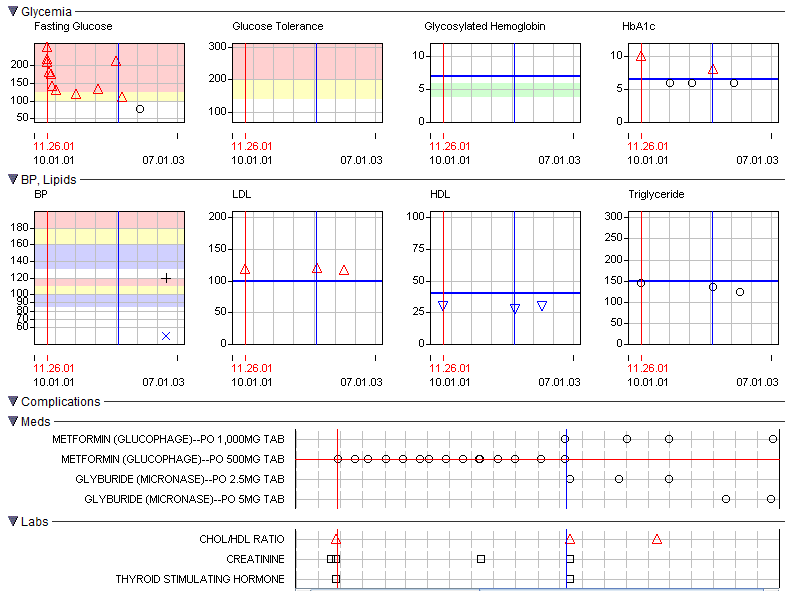
Diabetes View live demo    screen capture
Cardiac Timeline Summary live demo    screen capture
Liver Tests/Drugs Timeline Summary live demo screen capture
Blood Pressure Time Series Graphs live demo screen capture
Weight vs. Age Chart (up to 36 months of age) live demo screen capture
Weight vs. Age Chart (years 2 to 20) live demo screen capture

Planning and Scheduling

Planning U.S. Navy Ship Upgrades live demo screen capture

Military

Air Force Wargame Simulation live demo screen capture

System Monitoring

Computer Server Farm Data live demo screen capture

Politics and Economics

Presidential Election Poll Data live demo screen capture
U.S. Economy live demo screen capture

Manufacturing Quality

Manufacturing Statistical Process Control Chart live demo screen capture
Semiconductor Wafer Map live demo screen capture

Graphical Features

Time Series Symbol and Line Types live demo screen capture
Reference Lines and Regions live demo screen capture
Timeline Intervals and Data Points live demo screen capture

Before viewing the live demos, please install the Java web browser plug-in (version 1.4 or later).

If you are unable to install the Java Plug-in, you can still view static screen captures of DataMontage displays by clicking on "screen capture". Note that some browsers like Internet Explorer v6 will reduce the size of image files automatically to fit on the screen.  To view the full-size image using Internet Explorer 6, move your mouse over the image, wait for a resize button to appear, and then press it. Or, click a corner of your browser window and drag it to increase its size.

Additional Information 5.14.07 - Stottler Henke releases DataMontage version 2.0

11.6.06 - Stottler Henke releases DataMontage version 1.2

8.19.05 - Stottler Henke releases DataMontage version 1.1

9.21.04 - Stottler Henke introduces DataMontage software for rapid visual analysis of complex, time-linked data

3.1.2005 - Applied Clinical Trials - Tools for Clinical Trials Professionals

DataMontage provides patient data visualization within WebSDM™ a clinical data review tool developed by Lincoln Technologies and the FDA for use by FDA and pharmaceutical manufacturers. DataMontage is also incorporated within Lincoln Technologies' Clinical Trials Signal Detection™ (CTSD) system.

Overview PDF
User's Guide PDF
Developer's Guide PDF

Evaluation Request a 30-day evaluation copy of the software.
Contact Jim Ong
Stottler Henke Associates, Inc.
951 Mariner’s Island Blvd, Suite 360
San Mateo, CA 94404
www.stottlerhenke.com
650.931.2710
Email: ong@stottlerhenke.com


Copyright © 2006 Stottler Henke, Inc. All rights reserved.